 |
Back to the News & Information Section

Even if you're not a writer or graphics designer, you can put together a great brochure for your store.
Here are the steps:
Done!
Okay, maybe it's not that easy. But it's not that difficult, either.
In these days of computers, inexpensive software, and color copier centers, you can make just the right number of copies of a good-looking, inexpensive, easily changed brochure targeted to specific people and events, or a more long-lasting general brochure about your store.
A few weeks ago, Jayne Nold-Laurendeau asked me to make a brochure for her Falls General Store and Deli. Here's how I did it.
I started by asking her what was important, and learned she loved the architecture, and some of the special features--a train running along the ceiling, the old wood stove, and the hot pizza. She loved her bright, colorful store and the surrounding community. Quite a mix.
I collected Jayne's notes, photos, and writing for an earlier handout. I looked for the store's unique features: the decoration along the eaves outside, the colorful coffee machines, the cart of Vermont products. I waited in the store to see the trade. I searched for welcoming things, such as fresh bread, shelves of wine, and the American flag flapping briskly in the breeze that day. I took pictures of everything, from many angles, lights on, lights off. I went outside a snapped the words made of wood, "Cross Block 1892," mounted on the top of the store. I photographed covered bridges. With a digital camera, 100 pictures cost no more than just one, so why not?
Then I went home and wrote down what I saw, and compacted it into a few words:
| Look around the Falls General Store ... and what do you see? Shelves full of Vermont goods, and fresh coffee to grind or to pour. A deli ready with grinders of all sizes & styles, and hot pizzas cooked to perfection in their new oven. Sliced cold cuts, and a freezer full of our state's best ice cream. There's a cart of jam and salad dressing and honey and, of course, famous Vermont maple syrup. What else? Wines from across America to far-away Australia, and beer from the ones you know best to their special finds from Vermont micro-breweries. And ice ... for who can live without ice in the summer? There are local and Vermont T-shirts and mugs and spoons and ceramic bells and local postcards and drinking glasses and keychains and good ol' soft teddy bears. For the worker & hunter in you, there's to be found everything from gloves and caps and can coolers and reflectors to official hunting & fishing licenses, and a place to report your good luck. And if you're 15 feet tall, you might just bump your head on the rocker you were looking for, hanging from the ceiling. Or maybe that bird feeder is what you need. No, you can't have the antique sled or the crosscut saw. But if you can't have it, they can find it for you! And that's not all. Phil and Jayne cater dinners for parties, weddings, retirement events, anniversaries, and just about any other occasion you might need them for. Call the Falls General Store, in the historic Cross Block, at (802) 485-8044. Order a pizza. Ask for directions. Jayne and Phil are waiting for your call! |
I remembered the architecture and the model train and Jayne's miniature village that flowed around one corner near the freezer. The real Amtrak passed by outside as I was writing, and I considered how many tourists came to see the three covered bridges.
That was it for the writing. Simple, direct.
I looked through the pictures. The "Cross Block" one was good. The snapping flag looked great. I had buckets of inside shots.
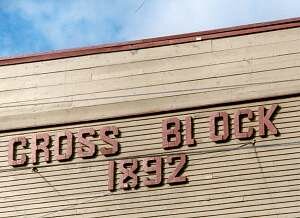 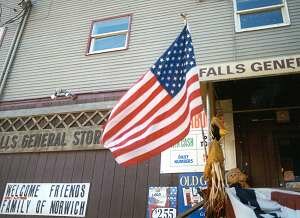
The Cross Block image is bright and dramatic with a blue sky in the background, and the flag was snapping perfectly in the wind. |
Now came The Production. The first time you do it, it's the most intimidating part of a printed brochure. Shortly it won't be. Here's what you'll need:
Start writing. Don't write too much -- just enough to tell what's important. Try to be interesting and colorful.
Type the text into your word processor, print a copy, and read it aloud. Does it sound natural? Does it sound like you normally speak? You didn't stumble over it, did you? Good. Read it to someone else. Have others read it to you. (Don't worry -- your family will get used to this strange behavior!). If it sounds peculiar, or it causes someone to stop reading, rewrite it so it's easier to read and more direct.
If any local writers frequent your store, pass it by them. (And don't forget to check your spelling.)
Photo editing used to be hard, but not any more. Good photo editors come with digital cameras and scanners.
Start with the psychological part. All kids look beautiful to their parents, and all stores look great to their owners. I'm comfortable in my messy office -- but in pictures, yuck!
So when you look at your photos, ask yourself: Do they actually show what I want? Is anything else in the picture that I don't want? Are they clear and bright and in focus?
Crop the pictures so they show only what you want. Use the software's controls to make them bright and clear, and liven up the color. If you took pictures under fluorescent lights, use the photo enhancement features to re-balance the color.
Have a look. The photos below are the original one, flat and dull. It has a light in it, and a fire extinguisher sign, and the image is mushy. The next one has improved sharpness, brightness and contrast; you can actually see the shelves of groceries and the specialty cart. The third photo improves the color balance so it looks like it's in sunlight -- but the nasty fluorescent light and the sign are still there.
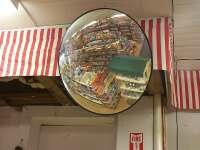 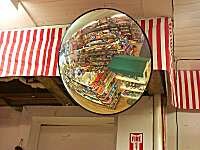 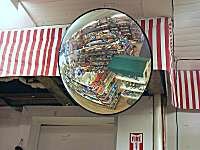
1. Dull and flat. 2. Brighter but yellow. 3. Color balanced but with distractions. |
Finally, I got rid of the light and the sign; cropping it kept the focus on the curved mirror. It went from a dull photo with distractions to one that's clear and intriguing at the same time. And the whole process took about two minutes with the photo editors automated controls for brightness, contrast, sharpness, and color balance.
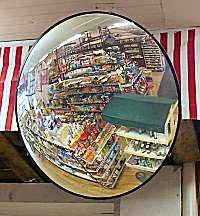
Finished photo gives focus to the store. |
Give your pictures a consistent and welcoming look. Here's one way: Duplicate the photos, and add drop shadows to the second set. Sometimes you'll use the shadowed photos, sometimes not. But shadows will help photos jump off the page like a three-dimensional photo album. See the ordinary photo below, and the shadowed one next to it -- all done with a few mouse clicks:
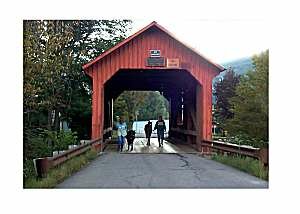 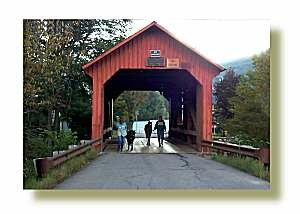
Bridge photo is good, but with a drop shadow it gives it dimension. |
Chances are that a simple four- or six-panel brochure will be fine. I like six-panel the best ... like a folder letter, but held vertically.
Your software probably comes with templates. Use templates. They make life easy. (Microsoft Word calls this style a "classic brochure," for example.) Don't forget how your brochure folds up, though! Use a real piece of paper to find out which panel goes where on the sheet of paper.
Here is my layout on the computer screen. You can see some shadowed photos, plus some pushed together to form a border on two sides of the page:
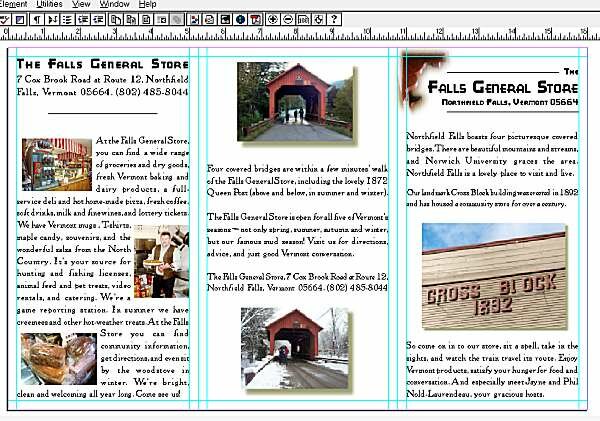
The layout above has the front and back panels, and the right panel as the brochure opens. 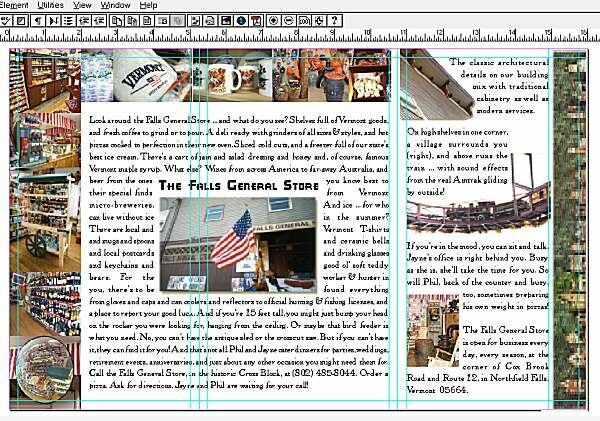
The layout above has the interior, with a two-panel spread on the left, and the miniature village running along the right edge. |
I use the say hello, grab 'em, show 'em, remind 'em, and remind 'em again technique. Give your audience a good cover that lets them know who you are, provide good pictures to show who you are, remind them of your name, and remind them again who you are and your name.
For the Falls Store, I put the distinctive "Cross Block" photo on the cover. On the back went covered bridges (Since I live nearby, I actually delved into my own collection for summer and winter shots of the same angle -- emphasizing the store's all-season nature.)
When the brochure is opened, the first panel to be seen is on the right. Here went the food: coffee, pizza, and bread.
Finally the reader opens up to a two-panel spread of colorful pictures and text, with the flag in the middle, surrounded by the main text. On the right, at last, are the model train, wood stove, and architectural details, plus a nice design for the edge -- the miniature village flattened out and running vertically along the side. (I blended together eight separate photos to produce it. It took some time, and if you look very carefully you can see the seams.)
As I was working, I was thinking of good fonts to use. Nothing too fancy, just nice and legible. The real moment of revelation came for the large type -- and then I saw Jayne's display of coffee, one of the largest signs in the Falls Store. And, yes, I was lucky enough to have that very font in my collection!
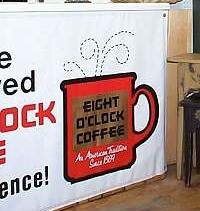 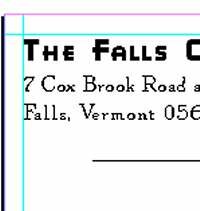
Eight O'Clock Coffee font was in my collection, and was perfect for the brochure. |
I remembered to put the name of the store on every page, along with the phone number and address as often as possible, popped everything into place, and dragged photos and text around until I liked it. As a final touch, I played with the store's architectural detail, turning it into a perfect little decoration for the front panel.
 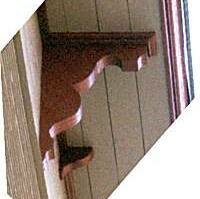 
The eaves photo (left) was rotated (center) and finally fogged and airbrushed (right). |

The brochure used the eaves as a decoration. |
Print a copy on two sheets of paper, and tape them back-to-back. Does it look like you think it should? Does it fold correctly? Are the panels in the right order? Are the photos balanced in color? Are there errors? (Have someone else proofread it. The writer can't!)
Then you're almost done. Put it away for a day or two.
After a few days' rest, look everything over once more. If you're satisfied, it's off to the print shop.
For this step, I prepare material for Mailboxes, Etc., who are well equipped. They probably have the software you used to create your brochure, so you don't have to go any further. The files will be huge, so put your final files on a Zip disk or burn them onto a CD-ROM. Include all the fonts and images that you used, and bring along a printed copy so the store personnel can compare their computer's output with yours.
|
(If you already have a page layout program like Pagemaker, it will probably include a product called Acrobat Distiller. You can use Distiller to make a final, fixed copy of your brochure that won't change in the slightest when you bring it to the printer, and will be perfectly set up for the copying machine at the print shop.) |
The output will be bright color xerography, and you'll love it! You can make as many as you need for about $1 to $2 each -- expensive unless you have a targeted audience. Later, if you need a large quantity, you can bring everything you've done to a 'real' printer.
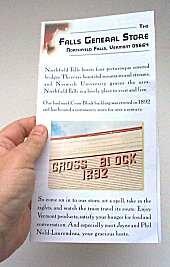 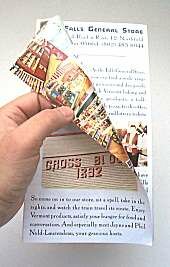 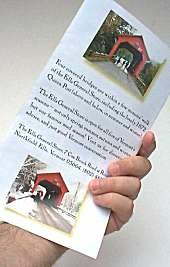
Final brochure looks good, opens nicely, and has a good sign-off on the back with covered bridges. |